I’ve been running a Proxmox cluster called Labparvum for years now, hosting everything from a private streaming service to infrastructure monitoring. Recently I added the piece I’ve had the most fun with: a fully self-hosted AI assistant running entirely on my own hardware. No cloud, no API keys, no per-token bills to OpenAI or Anthropic.
It chats through a web interface, runs open-weight models on my own (admittedly aging) GPUs, and can actually operate the homelab: reading metrics, checking the router, querying Proxmox, controlling Home Assistant, and drafting posts for this website. Like a lot of my projects, I’m also writing this up partly as documentation for myself.
This post covers how it’s built, and just as importantly, how I stopped it from accidentally taking down my infrastructure.
Where it runs
Everything runs on the existing Proxmox cluster. The main node is Gallifrey (PVE 9.2, Debian 13 “trixie”, kernel 6.14), and the assistant lives in an unprivileged LXC container, CT160. Not a VM and not the host itself.
I went with LXC for the same reasons I laid out in my homelab post: it shares the host kernel, so the resource overhead is minimal and it’s natively integrated into Proxmox. The one downside here is that it also shares the GPU driver with the host, which becomes relevant later.
The GPUs
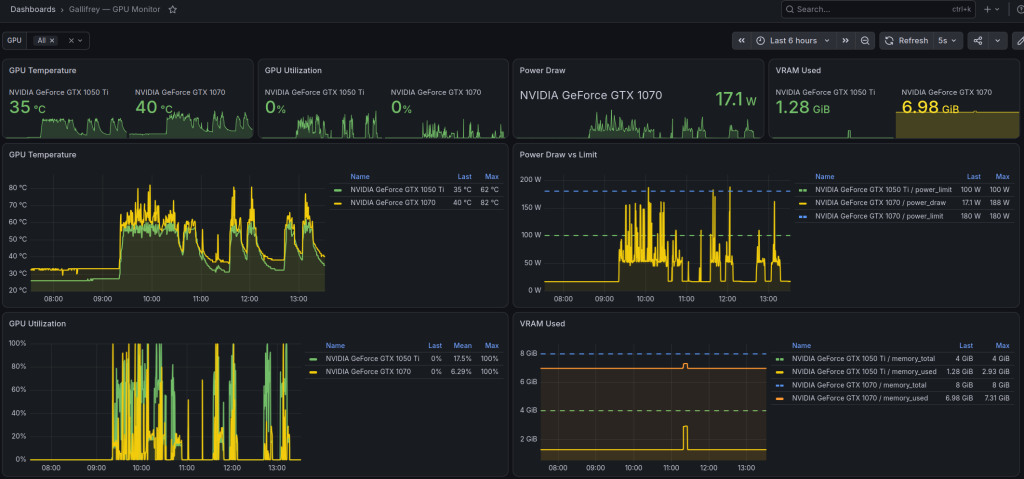
I have two NVIDIA Pascal cards passed directly into the container:
- GTX 1070 — 8 GB, ~256 GB/s (primary inference card)
- GTX 1050 Ti — 4 GB, ~112 GB/s (secondary, to avoid spilling into system RAM)
That’s about 12 GB of combined VRAM. This is old, cheap hardware, but Pascal is still surprisingly capable for inference with the right quantization and model choices, and it keeps the power draw of the whole thing reasonable, which matters to me for a machine that’s on 24/7. The one catch is the driver: I’m on 580.105.08, which is the last branch that still supports Pascal. More on that headache later.
The inference backends
Rather than rely on a single model or backend, I run two independent inference servers side by side, each suited to a different job.
Ollama
Ollama is a model manager and inference server for open-weight LLMs. It’s the easy path: simple to run, and it handles GPU scheduling for you. I use it for the day-to-day chat models. I raised its global context window to 32K tokens, since the default 4K runs out fast in any real conversation.
Its scheduler fills the GTX 1070 first, then the 1050 Ti, and only spills to system RAM as a last resort. LLM generation is memory-bandwidth bound, so once a model spills into RAM it slows to a crawl. I avoid that by picking models that fit in VRAM rather than letting it happen.
Models I currently keep installed:
- Qwen3.5 9B (fast, general-purpose)
- Qwen3.6 27B / 35B (bigger, more capable)
- Gemma4 31B
- MedGemma 27B (medical domain)
- Qwen2.5 7B (lightweight)
llama.cpp server
For the largest model I run a hand-tuned llama.cpp server instead. llama.cpp gives you far more control over how a model is split across GPU and CPU, which is exactly what you need when you’re trying to fit something big onto small cards.
The model here is Qwen3.6-35B-A3B, a Mixture-of-Experts (MoE) model. It has 35 billion total parameters but only routes through about 3 billion of them per token, so it punches well above what its size suggests in terms of speed. I run it at Q4_K_XL quantization.
The trick to fitting it on 12 GB of VRAM is to split it by function rather than by layer: the attention and KV cache stay on the GPUs, while the MoE expert layers run on the CPU. Flash attention is on, and I quantized the KV cache to q8_0 to save memory. Together that leaves enough headroom for a 64K token context, which is roughly the ceiling for this pair of cards. It exposes an OpenAI-compatible API, so the frontend talks to it exactly like it talks to Ollama.
The frontend: Open WebUI
The chat interface is Open WebUI, a self-hosted, Python-based frontend running on the LAN. It’s the familiar ChatGPT-style layout: a model picker, per-chat context length, conversation history, and so on. Since both backends speak the same API, I can switch between the Ollama models and the big llama.cpp model from the same dropdown.
Web search is handled by a self-hosted SearXNG instance, a meta-search aggregator that pulls results without handing my queries to Google or Bing. Keeping it in-house fits the rest of the setup: nothing about a search leaves the network.
Open WebUI is also where the tools plug in, which is what turns the chatbot into something that can actually do things.
The tool layer
On its own the assistant just answers questions. The tools are a set of custom Open WebUI functions that let it read from and act on the actual homelab. This is the part I find genuinely useful rather than just a novelty. The current toolset:
| Tool | What it does |
|---|---|
| Homelab SSH | Runs allow-listed diagnostics on any node, container, or VM across the cluster over a restricted SSH key |
| Proxmox Cluster Status | Read-only view of nodes, VMs, containers, storage, and tasks via the Proxmox API |
| Homelab Metrics | Queries InfluxDB time-series data — temps, fans, power draw, GPU/CPU load, network, router, workstation stats |
| OPNsense Router | Read-only router status: WAN, interfaces, DHCP leases, ARP, firewall logs, DNS stats, system load |
| Home Assistant | Reads entity states and, with confirmation, controls smart-home devices |
| WordPress | Reads posts and, with confirmation, drafts/updates/publishes content on this website |
Deploying these is scripted, so a single command pushes the tool code and secrets into Open WebUI idempotently. It’s a small thing, but it means I can rebuild or upgrade the container without reconfiguring everything by hand, which I’ve learned the hard way is worth the up-front effort.
Keeping it from wrecking things
Giving an LLM access to your infrastructure is the part that should make you nervous, and it’s where I spent most of my time. I didn’t want to find out what happens when a model gets confused and decides to “help” by deleting something. The whole thing is built as defense in depth, with several layers that each have to fail before anything bad can happen.
Forced-command SSH gate. The assistant’s SSH key can only run a single vetted gatekeeper script on the target host. It can’t open a shell at all. Everything the AI does on a machine goes through that one script, which is the foundation the rest builds on.
Allow-list first. Read-only commands (status, list, metrics) run automatically. Everything else is denied by default. The model doesn’t get to act unless a command has been explicitly permitted.
Explicit confirmation to act. Anything that changes state has to be prefixed with ACTION, and the UI only adds that prefix after I confirm it in chat. The model can propose a change, but it can’t carry it out without my say-so.
A hard-deny list that confirmation can’t override. Some operations are blocked no matter what: no rm -rf, no ZFS/LVM/Ceph pool destruction, no deleting VMs or containers, no reboots or shutdowns, no user or permission changes. It also can’t escape the gate by dropping into a shell or an interpreter.
No shell metacharacters. Pipes, redirects, command chaining and command substitution are all blocked, so commands can’t be smuggled together into something the allow-list didn’t anticipate.
The net effect is that the assistant can look at anything and do a curated set of safe things, but the genuinely destructive actions are impossible by construction rather than by politely asking it not to.
A few things that went wrong
As usual, it wasn’t all smooth. A few hurdles worth writing down:
The Pascal driver squeeze. Newer Ollama versions refuse to start on NVIDIA driver older than 570, but driver 590 and up drops Pascal support entirely. That leaves exactly one usable branch: 580. Debian’s repos didn’t carry it, so I ended up doing a manual .run installer migration with snapshots taken first so I could roll back. Because the container shares the host driver, every OS update now needs a quick check that I haven’t clobbered it.
Fitting a 35B model onto 12 GB. This is the experts-on-CPU split described above, combined with the q8_0 KV cache. The payoff is a model that’s actually useful for long-context work, running on cards that cost next to nothing second-hand.
Context-window whack-a-mole. Long chats kept running into context limits. Raising Ollama to 32K dealt with most of it, and pushing llama.cpp to 64K handled the rest. The thing to watch is that llama.cpp pre-allocates the full context in VRAM up front, so the context size you pick has to actually fit alongside the model, not just in theory.
Why bother
A few reasons this was worth doing for me:
- Privacy. Nothing leaves the house. My conversations, homelab metrics and smart-home state all stay internal.
- Ownership. No per-token bills, no vendor lock-in, and no service that can change its terms or disappear on me.
- Capability on cheap hardware. With sensible quantization and model choices, old Pascal cards are still perfectly usable for inference. You don’t need a €3,000 GPU to run something genuinely helpful.
- The interesting part isn’t the chatbot. Anyone can spin up a local LLM and talk to it. The actual work is the tool layer and the safety constraints that let it act on real systems without being a liability.
If you want more detail on any part of this — the driver install, the llama.cpp tuning, or the safety gate — let me know in the comments and I’ll go deeper. As with most of my projects, this one is still evolving.
Quick specs
| Component | Details |
|---|---|
| Host | Proxmox cluster “Labparvum”, node Gallifrey, LXC CT160 |
| GPUs | GTX 1070 (8 GB) + GTX 1050 Ti (4 GB), NVIDIA driver 580 |
| Backends | Ollama + llama.cpp (both self-hosted, OpenAI-compatible) |
| Frontend | Open WebUI (LAN) |
| Web Search | Self-hosted SearXNG |
| Biggest Model | Qwen3.6-35B-A3B (MoE), 64K context |
| Other Models | Qwen3.5 9B, Qwen3.6 27B, Gemma4 31B, MedGemma 27B, Qwen2.5 7B |
| Agent Tools | SSH diagnostics, Proxmox, InfluxDB metrics, OPNsense, Home Assistant, WordPress |
| Safety | Forced-command SSH gate, allow-list, confirm-to-act, hard-deny destructive ops |
| Cloud Dependency | None |